![Primary.svg]](https://help.studyforge.net/hubfs/Primary.svg)
Want to stay in the loop with new features, improvements, and bug fixes in the StudyForge platform?
Sign up to receive regular updates and be the first to know what’s new and improved! https://studyforge.net/release-notes-sign-up/
Improvements
Tuesday, April 28, 2026
- For Content creators: we added the ability to add a link option that opens the Print Notes dialog directly from lesson content.
- Content creators can add a link inside a Reading that opens the Print Notes dialog for students.
Use the following link inside the Reading HTML: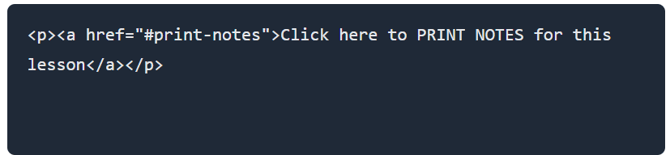 When students click the link, the Print Notes dialog opens automatically.
- Content creators can add a link inside a Reading that opens the Print Notes dialog for students.
- Improved drag-and-drop support on iPad devices for question workspace items and images.
Bug Fixes
Tuesday, April 15, 2026
- Fixed an issue that sometimes caused incorrect content to appear when loading certain pages.
- Fixed an issue where keyboard navigation could move outside of pop-up windows while they were open.
Tuesday, April 28, 2026
- Fixed an issue where grades from manually graded quizzes were sometimes not syncing to Canvas.
- Fixed display and formatting issues in the Delete Deployment confirmation window.
- Fixed an issue that sometimes prevented low license notification emails from being delivered.
- Fixed an issue where some images were not displayed correctly in lessons using the updated lesson view.
- Fixed an issue where users could sometimes assign roles with permissions higher than allowed for their current access level.
- Fixed an issue where some integration settings were displayed incorrectly when editing existing LMS connections.
- Fixed an issue that sometimes disconnected users while interacting with lesson content.
Wednesday, April 29, 2026
- Fixed an issue that caused some users to lose connection while accessing lesson content.